
Data Duplicator
When teams need to deploy, archive, or process large numbers of storage devices, speed and consistency matter just as much as data integrity. A dedicated Data Duplicator helps streamline repetitive copy tasks without tying up a PC, making it a practical choice for IT departments, repair centers, production lines, digital forensics workflows, and media preparation environments.
On this page, you can explore duplication systems designed for HDD and SSD workflows, including stand-alone units for SATA and SAS media. These devices are built for high-volume copying, batch handling, and repeatable operation, with features that support verification, erase functions, and broad file system compatibility.
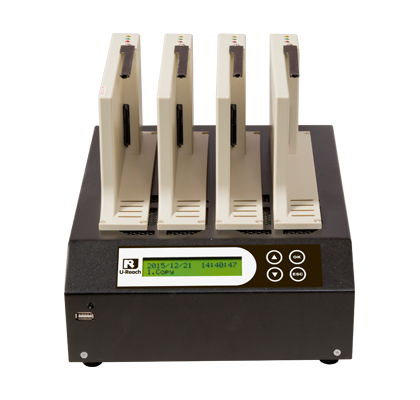
What a data duplicator is used for
A data duplicator is typically used to copy content from one source drive to multiple target drives in parallel. Compared with software-based cloning on a workstation, a stand-alone duplicator can simplify production tasks by reducing operator involvement and delivering a more standardized process across multiple drives.
This type of equipment is especially useful where organizations need to prepare many identical drives, duplicate system images, reproduce application environments, or handle recurring storage turnover. If your workflow focuses more on secure wiping rather than copying, you may also want to review dedicated data sanitizing systems for media disposal and compliance-oriented erase tasks.
Common applications in technical and business environments
In B2B settings, duplication hardware is often selected for practical throughput rather than general office use. It can support IT asset preparation, embedded system deployment, software image distribution, field service replacement stock, educational lab setup, or maintenance operations where multiple drives need the same configuration.
Because many units work independently of a host computer, they fit well into controlled or repetitive workflows. A stand-alone platform can also help reduce compatibility issues between operating systems and software utilities, which is valuable when working with mixed environments such as Windows, Linux, and Mac file systems.
Key features to evaluate before choosing a system
The most important selection factor is usually target count—in other words, how many destination drives can be copied in one cycle. Smaller teams may only need a compact 1-to-3 or 1-to-7 setup, while higher-volume environments may prefer larger platforms that support 1-to-15 or even more targets per session.
Another major consideration is interface compatibility. In this category, available systems cover SATA-based workflows as well as SAS/SATA duplication, with support for different drive form factors and, in some cases, adapter-based compatibility for interfaces such as IDE, microSATA, mSATA, and M.2. Buyers should also look at copy modes, compare functions, bad-sector handling, logging capability, and whether the device supports stand-alone operation without a PC.
Representative Ureach models in this category
Ureach is one of the key manufacturers featured in this category, with multiple duplicator and duplicator-plus-sanitizer platforms aimed at different throughput requirements. For SAS and SATA environments, models such as the Ureach ITS-300SAS, ITS-700SAS, and ITS-1500SAS are positioned for 1-to-3, 1-to-7, and 1-to-15 workflows respectively, while offering hardware-based copy and compare functions.
For SATA-focused applications, examples include the Ureach IT300U, IT700U, and IT1500U for faster SATA III duplication, as well as IT300H, IT700H, and IT1500H for SATA II workflows. Larger batch requirements may also point users toward models such as the Ureach MT1600G or MT2400G, which are suited to environments where higher target counts are part of routine production or service tasks.
Duplication speed, verification, and workflow reliability
In real-world use, published copy speed is only one part of performance. Actual throughput depends on the source media, target drive quality, interface limitations, and whether the process includes compare or erase steps. Even so, higher-speed systems can significantly improve turnaround when many drives must be processed each day.
For many technical buyers, bit-by-bit comparison or similar verification functions are just as important as raw transfer rate. Verification helps confirm that the copied data matches the source, which is useful in deployment, service, and controlled production settings. Logging and PC monitoring features can also support traceability and task review, especially when multiple operators or batches are involved.
How to choose the right data duplicator for your operation
Start with the type of drives you handle most often. If your workflow includes enterprise storage media, a SAS/SATA model may be more appropriate. If your work is centered on standard SATA HDDs and SSDs, a SATA-focused platform may be sufficient and easier to align with day-to-day operations.
Next, estimate batch size realistically. A smaller duplicator may suit bench work, diagnostics, or occasional imaging, while larger systems make more sense for recurring volume. It is also worth checking whether your process needs quick copy support for recognized file systems, whole-drive copying for unknown formats, skip bad-sector options, or built-in erase modes for devices that need to be repurposed after duplication.
Organizations comparing adjacent equipment types may also find it helpful to browse the broader data duplicator range together with related workflow tools. If your requirement extends beyond storage handling into operational equipment, there are also other product groups under office and production support, though they serve very different purposes.
Data duplicator vs. data sanitizer
These two categories are closely related but serve different priorities. A data duplicator is intended primarily for copying source content to target drives efficiently and consistently. A data sanitizer, by contrast, focuses on erase workflows designed to remove data from storage devices before reuse, resale, or disposal.
Some units in this category combine both capabilities, which can be useful for organizations that image drives in one stage and securely erase media in another. If secure deletion is central to your process rather than a secondary feature, it may be worth exploring the dedicated Data Santinizer category alongside duplicator systems.
Why stand-alone duplication remains relevant
Despite the availability of software cloning tools, hardware duplicators remain valuable because they are designed for repeatable, high-volume handling. Operators can run jobs without dedicating a computer to each task, and the process is often easier to standardize across service benches, warehouses, or manufacturing support areas.
For businesses that routinely prepare replacement drives, distribute identical software images, or process storage media in batches, a dedicated drive duplication workflow can save time and improve consistency. The right system depends on your interface requirements, expected throughput, and whether you also need verification, monitoring, and sanitization functions in the same device.
If you are selecting a solution for repeated HDD or SSD imaging tasks, this category provides a practical starting point. Review the supported interfaces, batch size, copy modes, and erase options carefully so you can match the duplicator to your actual operating environment rather than choosing only by maximum speed or port count.
Get exclusive volume discounts, bulk pricing updates, and new product alerts delivered directly to your inbox.
By subscribing, you agree to our Terms of Service and Privacy Policy.
Direct access to our certified experts