Input Devices
Reliable operator interaction starts with the right hardware. In industrial control stations, kiosks, panel PCs, and embedded HMI environments, input hardware affects usability, response time, maintenance effort, and overall workflow efficiency. Choosing suitable Input Devices means looking beyond basic office peripherals and focusing on compatibility, operating conditions, and the way people actually work with machines.
This category brings together practical interface hardware used to enter commands, navigate applications, and support everyday interaction in industrial and technical settings. Depending on the application, that may include compact keyboards, mouse combinations, wireless sets, or device-specific operator inputs that fit into a broader HMI architecture.
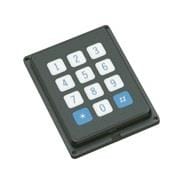
Where input devices fit in an HMI system
In many installations, the HMI is more than just a display. Operators may need to enter production data, switch between screens, acknowledge alarms, configure parameters, or interact with supervisory software during setup and maintenance. In these situations, input hardware becomes a core part of the operator interface rather than a simple accessory.
Input devices are often selected alongside LCD touch panels or other visualization equipment so the full station is easier to use. Touch control may be ideal for normal operation, while a physical keyboard or mouse is often more efficient for data entry, service access, or engineering tasks.
Common use cases for industrial and technical input hardware
Different applications call for different input styles. A panel PC on a production line may need a straightforward keyboard and mouse set for local operator use, while a machine builder may prefer compact or wireless options to simplify cabinet and workstation layout. In service environments, technicians may also need temporary input devices for diagnostics and commissioning.
This is why the category can include both standard-style peripherals and more specialized control-related products. For example, the HP KM100 Keyboard and Mouse is representative of a familiar desktop-style input approach, while the Advantech 96KBMS-104W-LT-UB shows how input hardware also supports industrial computing and embedded HMI deployments.
What to consider when selecting input devices
The first point is interface compatibility. Buyers typically need to confirm USB or other required connectivity, operating system support, and whether the device will be connected to a panel PC, industrial computer, or external controller-based interface. In technical environments, simple compatibility issues can create unnecessary downtime during installation.
The second point is the operating environment. Exposure to dust, routine cleaning, limited mounting space, and frequent operator use all influence product choice. Some projects prioritize familiar desktop ergonomics, while others need more robust hardware that aligns with industrial system design and can be integrated with adjacent HMI accessories.
A third factor is workflow. If operators mainly select on-screen functions, physical input may play a secondary role. If they regularly enter codes, recipes, lot data, or maintenance notes, then keyboard layout, pointing convenience, and user comfort become much more important over time.
Examples from leading manufacturers in this category
Several recognized suppliers appear across this category, each relevant to different use cases. Advantech is widely associated with industrial computing and embedded interface environments, making it a natural fit where input devices must work reliably with technical workstations and panel-based systems. HP products, including the HP KM100 Keyboard and Mouse, can be suitable where users want familiar operation in office-meets-industrial settings.
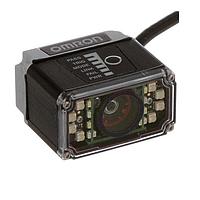
Omron Automation and Safety appears in this category through barcode reader models such as the V430 and V420 series, illustrating that operator input is not limited to keyboards and mice. In many real-world HMI applications, scanning devices are also part of the input layer because they capture production, identification, and traceability data directly into the system.
Banner Engineering and Honeywell also help broaden the category context. Products such as the Banner Engineering TCNM-EX-1210 barcode reader or Honeywell operator-related components show how input can extend into machine interaction, code acquisition, and process support functions, especially in automated handling and industrial data collection.
Barcode readers as a practical form of data input
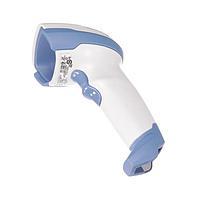
In industrial environments, barcode readers are often just as important as conventional human interface tools. Instead of manually typing part numbers, batch IDs, or routing information, operators can scan data directly into the control or software layer. This improves speed, reduces entry errors, and supports traceability in warehousing, packaging, and production applications.
Examples in this category include Omron Automation and Safety V430 industrial Ethernet barcode readers and V420 miniature barcode readers, along with the V320 commercial barcode reader family. These products highlight different integration approaches, including compact form factors and communication options suitable for machine-level or workstation-level deployment. For applications centered more heavily on display-driven operation, related interface elements such as display switches may also complement the overall operator control concept.
Matching the device to the operating environment
Not every input method performs the same way in every setting. A clean control room, a warehouse station, and a machine-mounted operator terminal each present different requirements. Environmental protection, cable routing, available space, and user frequency all affect the most practical choice.
For example, some barcode reader models in this category include industrial-oriented protection ratings and communication options that make them more appropriate for demanding conditions. Meanwhile, keyboard and mouse combinations may be preferred for enclosed workstations, engineering benches, or operator desks where standard data entry is the priority. The right selection depends on how the station is used, not only on the product type itself.
How this category supports broader operator interface design
Input devices should be selected as part of the full HMI workflow, not as an afterthought. The user may need to move between physical input, touch interaction, and visual status feedback during a single task. That is why many buyers evaluate input hardware together with screens, control components, and panel integration needs.
In projects where directional control or machine motion input is required, other interface options such as joysticks for HMI systems may be more appropriate than standard peripherals. Taking this broader view helps create an operator station that is easier to use, easier to maintain, and better aligned with the real task on the factory floor.
Choosing input devices with long-term usability in mind
A good selection process balances operator comfort, technical compatibility, and application-specific input requirements. Some systems benefit from simple keyboard-and-mouse bundles, while others depend more on scanner-based data capture or specialized control inputs. Looking at the full interaction pattern usually leads to a better result than focusing on one specification alone.
Whether you are building a new workstation, updating an HMI panel, or expanding an industrial data-entry point, this category helps narrow down practical options for dependable operator interaction. Reviewing the environment, connection requirements, and intended workflow will make it easier to choose input hardware that fits the system and supports everyday operation.
Get exclusive volume discounts, bulk pricing updates, and new product alerts delivered directly to your inbox.
By subscribing, you agree to our Terms of Service and Privacy Policy.
Direct access to our certified experts