
Joysticks
Precise directional control matters in operator panels, compact machines, gaming-style interfaces, and embedded HMI projects. Whether the goal is menu navigation, axis control, or multi-direction input in a limited panel area, joysticks provide a practical way to combine user input, tactile feedback, and compact mechanical design.
Within an HMI environment, this category covers more than one control style. Some products are designed for multi-direction human input, while others in the broader switch ecosystem support signal routing, position detection, or specialized switching functions used alongside interface hardware. That makes selection less about appearance alone and more about movement style, electrical requirements, mounting method, and the application environment.
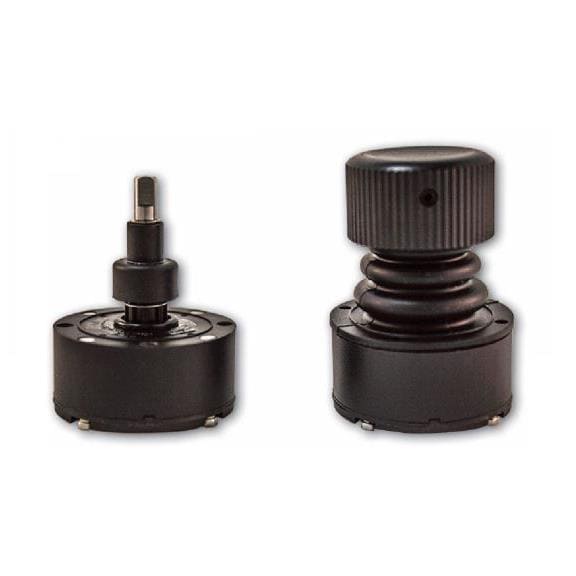
Where joystick controls fit in HMI systems
In industrial and embedded interfaces, a joystick is often chosen when an operator needs intuitive directional input without the larger footprint of a full keyboard or the cost of a more advanced touch interface. It can be used to move through screens, position a cursor, control machine motion in defined directions, or trigger menu actions with a push or center-select function depending on the device design.
For projects that combine several operator interface methods, joysticks are commonly used alongside input devices and display-based controls. In compact panels, they can also complement LCD touch panels when tactile control is preferred for gloved operation, vibration-prone environments, or simple navigation tasks.
Different joystick and navigation switch styles
Not every product in this category serves the same purpose. Some parts function as classic manual navigation controls, while others belong to the wider family of switch-based interface components that may be used in adjacent control designs. Understanding the operating principle helps narrow the shortlist quickly.
A clear example is the Alps Alpine RKJXL100401V, an 8-directional stick switch intended for compact directional input. For simpler navigation, the Adafruit 504 5-way navigation switch is suitable for designs that need up, down, left, right, and center actuation in a through-hole format. These products are especially relevant in small HMIs, handheld control units, and embedded electronics where panel space is limited.
Some listed products, such as models from Alps Alpine, focus on electromechanical human input, while others in the broader category may support specialized switching roles. This mix is useful for engineers comparing tactile user controls with switch components that interact with the same system architecture.
Key selection criteria before you choose
The first factor is the directional function required by the application. A 5-way navigation switch may be enough for menu control and basic selection, while an 8-direction design can provide more nuanced movement where diagonal input improves usability. If the interface is tied to machine positioning or camera movement, directional resolution becomes more important.
Next, check the electrical characteristics and integration method. Low-current signal-level joystick switches are appropriate for direct input to controllers, microcontrollers, or HMI boards, but they should still be matched to the target voltage, current, and I/O design. Mounting style, panel or PCB layout, and expected actuation frequency also influence long-term reliability.
Environmental range should not be overlooked. Temperature limits, duty cycle, and exposure to dust or vibration can affect performance over time. In industrial settings, the joystick is only one part of the user interface, so selection should also consider the enclosure, wiring method, and the rest of the control hardware around it.
Mechanical joysticks and electronic switch technologies
Many buyers associate this category only with manual stick controls, but some applications involve electronic switching technologies that support signal selection rather than physical navigation. For example, Analog Devices offers RF switch components such as the ADG936BRUZ-REEL, ADG936BRU, and ADG902BCPZ-REEL7, which are designed for controlled signal paths across defined frequency ranges. These are not operator joysticks, but they illustrate how “switch” products may appear in adjacent interface and electronics contexts.
That distinction is important during procurement. If the requirement is human-machine interaction, the focus should stay on actuator feel, travel, directional logic, and mounting. If the project is centered on signal routing, embedded electronics, or RF path control, then electronic switch specifications such as topology, insertion loss, and frequency range become the main decision factors instead.
For broader operator panel builds, users may also review display switches where visual status and switching functions need to work together in the same HMI assembly.
Representative manufacturers in this category
Several recognized brands appear in this product range, each relevant to different use cases. Analog Devices is especially relevant when the application leans toward electronic or RF switching functions. Alps Alpine is a strong reference point for compact electromechanical interface components, including multi-direction stick switches suited to navigation tasks.
Other names such as Adafruit, Banner Engineering, BAUMER, and Allegro MicroSystems can help expand design options depending on whether the project is educational, embedded, industrial, or sensor-oriented. Rather than choosing by brand alone, it is usually more effective to compare the actuation concept, form factor, and system compatibility first, then narrow the search to a preferred manufacturer.
Typical applications for joystick-based input
Joystick and navigation controls are used in compact HMIs, industrial operator stations, control pendants, embedded devices, testing interfaces, and custom electronics. In some cases they provide direct directional control; in others they act as a robust alternative to multiple pushbuttons by combining several commands into a single control element.
They are especially useful where users need tactile confirmation without relying entirely on a touch surface. This can improve usability in environments with gloves, limited visibility, or repetitive navigation tasks. In broader HMI layouts, a joystick may also be paired with nearby screens, keys, or accessories to create a more efficient control workflow.
How to narrow the shortlist efficiently
A practical way to evaluate products is to begin with the user action itself: navigation, directional control, menu selection, or signal switching. Then confirm how many directions are needed, whether center push is required, and whether the part will be PCB-mounted or panel-integrated. This prevents over-specifying the component and helps avoid mismatches later in assembly.
After that, compare operating conditions, electrical limits, and the surrounding interface design. If the joystick is part of a larger operator panel, it may be helpful to review related HMI parts such as accessories or adjacent control components to ensure fit and consistent operation across the system.
Final considerations
The right joystick choice depends on how people will interact with the equipment, not just on the part name. By comparing directional behavior, mounting style, signal requirements, and operating conditions, buyers can identify a control that fits both the HMI design and the real working environment.
This category is therefore most useful when viewed as a functional selection space: from compact navigation switches for embedded control to related switching components used in broader interface electronics. A careful match between application intent and device type will lead to a more reliable and more usable system.
Get exclusive volume discounts, bulk pricing updates, and new product alerts delivered directly to your inbox.
By subscribing, you agree to our Terms of Service and Privacy Policy.
Direct access to our certified experts
