Hard Drives HDD
When storage capacity, long data retention, and cost-per-terabyte matter more than ultra-low latency, traditional magnetic drives still remain a practical choice in many industrial and IT environments. From backup systems and surveillance storage to file servers and general-purpose data archiving, Hard Drives HDD continue to play an important role in infrastructure that needs dependable bulk storage.
This category brings together HDD options suited to professional use cases where buyers typically compare interface compatibility, form factor, spindle speed, endurance expectations, and total capacity. For engineering teams, procurement specialists, and system integrators, the goal is not simply to select a drive with enough space, but to choose one that fits the workload and operating environment.
Where HDDs still make sense in modern systems
Although flash-based storage has become common in performance-driven applications, HDDs remain highly relevant where large volumes of data must be stored economically. They are often selected for central repositories, scheduled backups, media retention, non-volatile data storage, and systems that prioritize capacity density over the fastest access times.
In many B2B settings, hard drives are used alongside other storage technologies rather than replacing them entirely. A system may rely on solid state drives for faster boot and application response, while HDDs handle historical data, large file sets, or less frequently accessed records. This layered approach helps balance performance, budget, and storage scalability.
Key factors to compare before buying
The most important starting point is capacity. Buyers should estimate both current storage demand and expected growth, especially in applications such as video retention, project file storage, machine data logging, or long-term backups. Choosing too little capacity can force an early replacement cycle, while oversizing without a clear need may not be cost-efficient.
Interface and form factor are equally important. SATA remains a common choice for broad compatibility in workstations, servers, and storage enclosures, while 3.5-inch drives are widely used where physical space and power availability are not as constrained as in compact embedded systems. It is also important to confirm controller support, mounting space, and enclosure compatibility before ordering.
Another useful point of comparison is rotational speed and sustained transfer behavior. Drives in the 7200 RPM class are commonly chosen when users need a balance of capacity and reasonable throughput for business workloads. Cache size, workload pattern, and expected duty cycle should also be reviewed as part of the overall storage design rather than as isolated specifications.
How performance and reliability should be evaluated
For HDD selection, performance should be judged in context. Sequential transfer rates matter when the system frequently reads or writes large files, such as backups, imaging data, video assets, or archived production records. Random access behavior may be less critical in these scenarios than in database-heavy or low-latency applications.
Reliability indicators such as MTBF, load/unload cycle expectations, and operating profile can help buyers compare options more effectively. These figures do not guarantee service life in a specific installation, but they do provide useful guidance when reviewing drives for business continuity, maintenance planning, and replacement strategy. In professional environments, drive choice should also be aligned with cooling conditions, vibration exposure, and operating hours.
Example product in this category
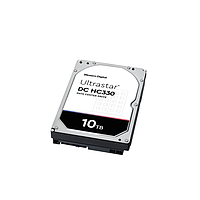
One representative option is the Western HC330 HDD, a 3.5-inch SATA drive with 10TB capacity, 7200 RPM performance class, and 256MB cache. This type of configuration is typically relevant for installations that need substantial storage volume with standard SATA connectivity and a format suitable for common rack, tower, or storage chassis deployments.
For buyers standardizing around a specific vendor ecosystem, Western is one of the manufacturers commonly considered in HDD sourcing. In practical terms, the right model still depends on the workload profile, retention policy, enclosure design, and whether the drive will operate as a standalone storage device or as part of a broader array.
Common business and industrial use cases
Hard drives are often deployed in backup appliances, engineering file storage, video retention systems, and office or plant-level servers where large datasets must be preserved cost-effectively. They are also relevant in environments where data is written in batches, retained for compliance or traceability, and accessed periodically rather than continuously at peak speed.
In mixed-storage architectures, HDDs complement faster media instead of competing with it directly. For example, active projects and operating systems may sit on flash storage, while completed jobs, image libraries, test data, and historical logs are stored on larger-capacity disks. This makes HDDs a useful part of a practical storage hierarchy for many B2B deployments.
HDDs compared with other storage formats
Understanding adjacent storage categories can help narrow down the right choice. If the application requires very fast access times, lower mechanical sensitivity, or compact deployment, users may review related hard disk drive options alongside newer flash-based formats. If removable or portable media is required instead, the decision criteria will be different again.
Likewise, applications centered on media distribution or legacy disc-based workflows may still involve optical drives, but that is a separate use case from mass magnetic storage. The right category depends on whether the priority is capacity, access speed, removability, portability, or workflow compatibility.
Practical selection guidance for procurement teams
Before placing an order, it helps to confirm a few operational points: required usable capacity, interface compatibility, system bay size, expected read/write pattern, and whether the drive is intended for continuous operation or more intermittent use. These checks reduce the risk of selecting a drive that fits the specification sheet but not the actual installation.
It is also worth considering the broader storage roadmap. A drive purchased today may become part of an expanded array, backup rotation plan, or hybrid storage environment later. Reviewing future capacity growth, replacement intervals, and serviceability can make the category selection process more efficient and support better long-term asset planning.
Final thoughts
For organizations that need scalable and economical data storage, HDDs remain a relevant and practical option. The best choice usually comes from matching capacity, interface, physical format, and reliability expectations to the real workload rather than focusing on a single headline specification.
By comparing application needs carefully and reviewing representative products in this category, buyers can identify hard drives that fit both current operations and future storage growth. That approach is especially useful in technical B2B purchasing, where compatibility, lifecycle planning, and total storage strategy matter as much as the drive itself.
Get exclusive volume discounts, bulk pricing updates, and new product alerts delivered directly to your inbox.
By subscribing, you agree to our Terms of Service and Privacy Policy.
Direct access to our certified experts