
HDMI Cables
Reliable video and data transmission often depends on details that are easy to overlook, especially in control rooms, digital signage, embedded systems, workstations, and test environments. Choosing the right HDMI Cables helps maintain signal integrity, supports the required resolution and refresh rate, and reduces avoidable installation issues caused by length, connector fit, or cable construction.
On this page, buyers can compare HDMI cable options used in commercial and industrial settings, from short patch lengths for compact equipment layouts to longer assemblies for display routing. The category also includes interface components such as female-to-female couplers, which can be useful in structured cabling and panel-based connection schemes.
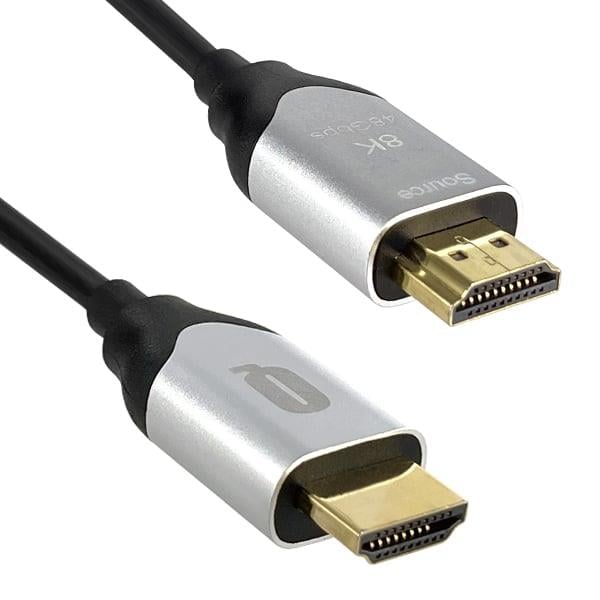
Where HDMI cables are typically used
HDMI remains a practical interface for carrying digital video and audio through a single connection, which is why it appears across many B2B environments. Typical use cases include connecting industrial PCs to monitors, linking media players to displays, extending operator interface screens, and supporting presentation or signage installations where dependable display output matters.
In some projects, HDMI cabling is selected alongside broader connectivity solutions such as computer cables or Ethernet / Networking Cables. That is especially common when a system combines video distribution, local device control, and network-based communication in the same cabinet, workstation, or commercial AV setup.
What to evaluate before selecting a cable
The most important selection factors are usually cable length, connector format, supported HDMI generation, and installation conditions. Shorter assemblies are often preferred where space is limited or where minimizing excess cable helps keep routing clean. Longer runs may be necessary for displays mounted at a distance, but the required performance should always be checked against the intended resolution and bandwidth needs.
Buyers should also consider physical construction details such as jacket material, wire gauge, and cable flexibility. A slim cable can make routing easier in tight spaces, while a more conventional build may be appropriate where durability and repeated handling are more important. In structured environments, connector retention and the overall fit between source and display equipment can matter just as much as headline video performance.
Examples of products in this category
This category includes straightforward HDMI patch cords for common point-to-point connections, such as the Panduit HDMI1MBL and Panduit HDMI2MBL, which are useful when a clean, standard-length connection is needed between nearby devices. For installations requiring a coupler-style interface, the Panduit NKHDMIBL provides a female-to-female HDMI connection format that can support modular or pass-through cabling approaches.
There are also longer cable options for more extended device spacing. Examples include the Belden HDE035FB, a 35 ft male-to-male cable, and HDMI cable assemblies from AMP Connectors - TE Connectivity in 1 m, 2 m, and 3 m lengths. Where a compact cable profile is beneficial, Eaton offers slim high-speed options such as the P569-010-SLIM series for display and digital audio/video connections.
Manufacturer options for different project needs
Several recognized suppliers appear in this range, each relevant to different sourcing preferences and installation styles. Panduit is well suited to buyers looking for structured connectivity components and practical patch-cord options, while Molex offers HDMI cable assemblies that can fit embedded, commercial, or equipment-level integration needs.
Other notable names in this category include Belden, Eaton, AMP Connectors - TE Connectivity, and JAE Electronics. Rather than focusing only on brand, it is usually more effective to match the product format to the application: patch connection, panel interface, longer-distance display hookup, or compact routing in dense equipment layouts.
HDMI versions, bandwidth, and practical compatibility
Not every application requires the same HDMI performance level. Some installations only need stable Full HD output, while others may require support for 4K video, higher refresh rates, or additional features such as Ethernet over HDMI where supported by the cable and connected devices. Reviewing the cable description carefully helps confirm whether a product aligns with the intended source, display, and media format.
Compatibility should always be assessed as a complete link, not just as a cable specification. The source device, display, adapters, and any couplers in the signal path can all influence results. For buyers working with mixed signal standards, it may also be useful to review related categories such as Audio / Video / RCA Cables when a project includes multiple AV interface types.
Installation considerations in professional environments
In business and industrial settings, cable choice is often influenced by routing constraints as much as by signal format. Tight bends behind displays, limited space in enclosures, and repeated connection cycles at service points can all affect which cable style is most appropriate. A cable that is electrically suitable but mechanically awkward may slow installation or create unnecessary strain on ports.
It is also worth considering how the HDMI connection fits into the broader device ecosystem. In some cases, HDMI is used purely for local display output, while in others it forms part of a more complex operator station or digital content system. Thinking through the complete layout in advance helps avoid mismatches in length, connector orientation, or accessory needs.
How to narrow down the right option
A practical buying approach is to start with the display requirement, then work backward to cable length and installation constraints. If the source and display are close together, a short 1 m or 2 m cable may be enough. If the cable needs to pass through a wall plate, cabinet opening, or modular faceplate, a coupler or structured interface component may be the better fit than a simple point-to-point lead.
For repeat purchases or multi-unit deployments, consistency is also important. Standardizing on a known cable format across workstations, kiosks, or signage endpoints can simplify maintenance and reduce replacement errors later on. This is especially useful for procurement teams managing larger rollouts across multiple locations.
Final thoughts
HDMI cable selection is rarely just about finding a connector that fits. The better choice is the one that matches the real operating conditions of the installation, including distance, signal demands, physical routing, and system architecture. By comparing cable length, construction, and interface style across this category, buyers can identify options that support reliable video connectivity without overcomplicating the design.
Whether you need a short patch cord, a longer male-to-male assembly, or a modular HDMI coupler for structured cabling, this category provides a focused starting point for professional sourcing.
Get exclusive volume discounts, bulk pricing updates, and new product alerts delivered directly to your inbox.
By subscribing, you agree to our Terms of Service and Privacy Policy.
Direct access to our certified experts
