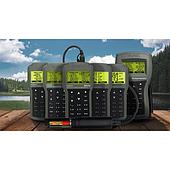
These errors sometimes confuse users, especially when needing to quickly measure PM2.5, CO₂, HCHO or TVOC indexes to assess the air condition in factories, offices or residential areas.
In this article, EMIN will help you learn the meaning of each error code, common causes and effective solutions to help the device operate stably and maintain accuracy throughout the use process.
Signs that your air quality monitor is malfunctioning
When the device is not working properly, users can easily recognize it through a few familiar signs. The screen may continuously display error codes such as E1, E2 or E3, the measurement data fluctuates abnormally, sometimes high and sometimes low without a clear cause. In some cases, the device automatically turns off in the middle or the sensor no longer responds to data. When your Bluetooth connection is interrupted, the data is not recorded, which is also another sign that the system is having problems.
When encountering these situations, it is best to pause the measurement, check the power source, battery, connection wire, etc. before continuing according to the specific troubleshooting instructions below.
Why does the machine show error E1, E2, E3?
Understanding the cause behind each error code will help users identify the correct problem, avoid incorrect troubleshooting and save processing time. Errors E1, E2, E3 are the most common situations, often directly related to the sensor or power supply to the machine.
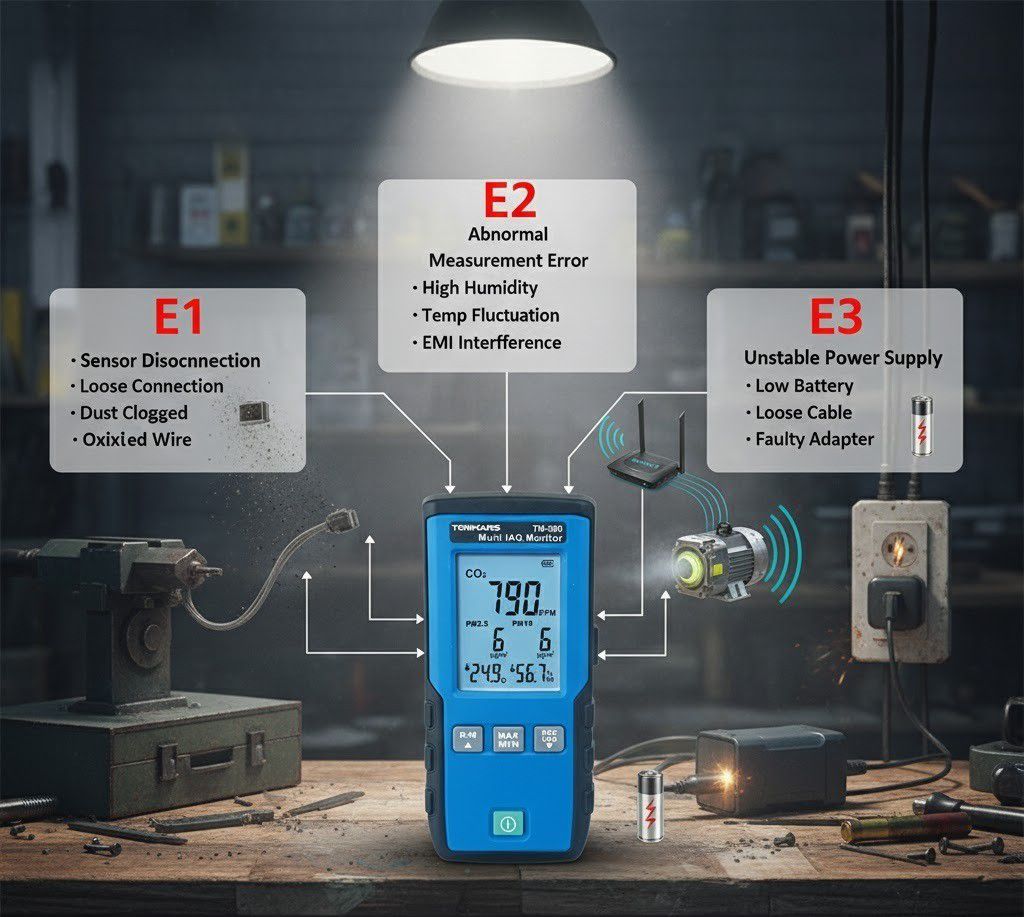
Error E1: Sensor lost signal
E1 usually occurs when the device does not receive a response from the sensor. The cause may be a loose connector, oxidized signal wire, or dust and moisture on the sensor surface, causing the signal to be obstructed.
After a long time of use, and if not cleaned periodically, the sensor head will become less sensitive, or even temporarily disconnect. Occasionally, users accidentally open the sensor cover while the device is operating, which can also cause this error to appear.
If the error message persists, it is likely that the sensor has degraded or the internal circuitry is damaged, and the meter will not be able to measure accurately until it is replaced or recalibrated.
Error E2: Abnormally high measurement error
When you see an E2 error, it usually means that the sensor is measuring a significant deviation from the actual value. This situation often occurs when the device has to work in a humid environment, with strong temperature fluctuations or high electromagnetic interference.
Improperly calibrated sensors also cause the output and input to no longer correspond, creating errors. In addition, if the device is placed near a heat source, motor or Wi-Fi router, the sensor signal may be disturbed, causing fluctuating results.
With devices that have been used for a long time, the phenomenon of sensor “aging” also causes sensitivity to gradually decrease, and data to become less stable. At this time, even though the device is still working, the measurement results will no longer be accurate until re-calibration or replacement of the sensor.
Error E3: Unstable power supply
Unlike the above two errors, E3 is directly related to the power supply to the device. When the power supply is not stable enough, the device will not be able to supply enough power to the sensor and the processing board, causing the system to stop working or report an error.
Weak battery, poor quality charger, loose power cord or poor contact socket can all cause this error. In industrial environments, strong voltage fluctuations can also cause the protection circuit to automatically shut down to avoid damage to components.
If the E3 error repeats many times, the power circuit or internal power supply IC may be damaged. This is a warning signal that needs to be paid attention to early, to avoid the machine operating in an unstable state, which may lead to more serious damage.
Suggestions on how to fix errors E1, E2, E3 on air quality meters
When the meter displays error codes such as E1, E2, E3, instead of worrying, you can completely check and handle the initial steps yourself.
1. Fix error E1:
E1 is a sign that the device is no longer receiving feedback from the sensor. The cause is often due to dirt, loose connections or damaged sensors. First, turn off the power or remove the battery to ensure safety during testing.
Then, gently remove the sensor cover, observe the connector and signal wire. If you see dust or moisture, you can use a dry cotton swab or compressed air to gently blow to clean. Once cleaned, reassemble carefully and start the tester.
If the device continues to report an error, it is likely that the sensor has degraded or the internal circuit has broken. In this case, the device should be brought to a technical center for inspection and replacement.
2. Fix error E2:
Error E2 often occurs when the operating environment is unstable or the sensor has not been properly calibrated. To fix this, place the device in a cool, dry place, away from strong winds, steam or high heat sources.
Next, restart the device and recalibrate the sensor according to the manufacturer's instructions. During the measurement process, avoid placing the device near electrical devices with strong magnetic fields or broadcasting such as motors, Wi-Fi routers.
If after calibration, the error still appears, there is a high possibility that the measuring circuit or the internal signal processing circuit has a problem, then you should send the device to the technical department for in-depth inspection.
3. Fix error E3:
In case the machine reports error E3, the cause is often an unstable power source: low battery, loose charging cable or incompatible charger. Start by checking the entire power supply line: battery, charging cable to charger.
Prioritize using genuine accessories or good quality ones, ensuring stable current during operation. If using the machine in a factory, consider connecting via a voltage stabilizer or UPS to avoid voltage fluctuations causing sudden shutdown.
In case the battery or power source has been replaced but the device still cannot start, it is very likely that the power circuit or internal power supply IC is damaged: in that case, a technician will need to check and repair it.
Some small notes you can refer to:
- Always turn off the power before cleaning or performing technical operations.
- Do not disassemble the circuit board without experience to avoid further damage.
- Regular maintenance helps the sensor to be clean, measure more stably and reduce the risk of errors E1, E2, E3 during use.
Popular air quality meters
On the market today, there are many air quality measuring devices that are trusted for both home and industrial use. Temtop C1 is compact, quickly measures PM2.5, PM10, CO₂, TVOC, suitable for use in enclosed spaces such as offices or homes. In the production environment, Tenmars TM-380 is highly appreciated for its high sensitivity sensor and stable accuracy.

See also:
How to improve air quality effectively
Regardless of which type is used, users should still clean and calibrate periodically to avoid errors such as E1, E2, E3 after a long period of operation.