Fiber endface inspection and cleaning should follow a simple rule: inspect before connecting, clean when contamination is found, then inspect again. Contamination can introduce loss and reflections, contribute to errors, and transfer between connector endfaces and ports during mating.
This applies to new and installed fiber components alike, including connector endfaces, equipment ports, adapters, test cords, jumpers, and pre-terminated trunk cables. A dust cap can prevent physical damage, but it does not confirm that an endface is clean.
Summary: Inspect every endface before mating. Clean only endfaces that need it, then re-inspect. Check ports and both sides of a connection. MPO connectors require particular care because their larger fiber arrays increase the opportunity for contamination transfer.
Why does fiber endface contamination cause network problems?
Contamination can obstruct the optical path at a connection and cause loss, reflections, high error rates, or degraded network performance. A particle on the fiber core can affect transmission, while contamination can also adversely affect the interface of optical equipment.
Exposure to surrounding air, accidental contact, dusty work areas, clothing fibers, body oils, and static electricity can all contaminate an endface. Contaminants may also migrate when a connector is mated or remated, including from an overlooked equipment port.
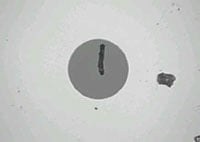
What is the correct inspection and cleaning sequence for fiber connectors?
The correct sequence is inspect, clean if necessary, and inspect again before making a connection. Cleaning alone does not verify cleanliness and can itself introduce contamination or static-related dust attraction.
- Inspect the connector endface and the corresponding port or adapter before mating.
- Clean only when inspection shows contamination or when the endface does not meet the applicable acceptance criteria.
- Inspect again after each cleaning attempt before connecting.
- Repeat this process whenever an endface is unplugged or removed from a dust cap or port.
Note: An endface that passes inspection should not be cleaned unnecessarily, because cleaning can attract dust through static electricity.
Which fiber components should be inspected before connection?
Both sides of every optical connection should be inspected, not just the connector that is easiest to access. This includes newly supplied factory-terminated connectors because protective caps and handling can still be sources of residue or particles.
For an adapter connection, inspect the two connector endfaces and the adapter sleeve. During testing or troubleshooting, inspect test equipment ports, adapters, test-cord endfaces, and every port that will receive a test cord.
How do optical microscopes and video inspectors differ?
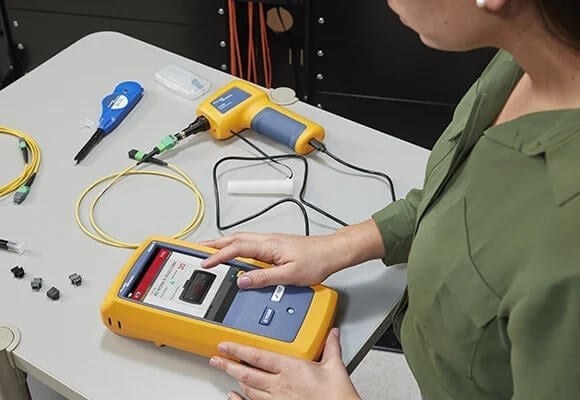
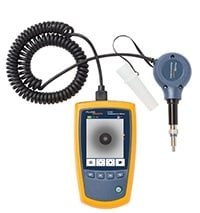
Optical microscope and fiber inspector both support fiber endface inspection, but they suit different access requirements. Optical microscopes provide direct viewing, while fiber inspector use a probe and display to examine connector endfaces, including ports in difficult locations.
| Inspection tool type | How it is used | Key consideration |
|---|---|---|
| Optical microscope | Provides direct inspection of the endface. | Compact and low cost, but cannot view endfaces inside equipment or through bulkheads. |
| Video inspector | Uses a small optical probe connected to a handheld display. | Useful for hard-to-reach ports; the displayed image reduces direct eye exposure to the endface. |
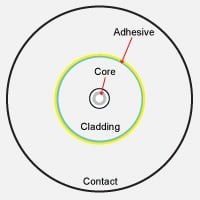
How does IEC 61300-3-35 help evaluate fiber endface cleanliness?
IEC 61300-3-35 provides pass/fail cleanliness grading criteria intended to make fiber endface evaluation more consistent. It assesses scratches and defects by their quantity, size, and location across regions such as the core, cladding, adhesive, and contact zones.
Acceptance criteria vary by connector type and fiber size. For the multimode polished connector example in the source material, the core permits no scratches wider than 3 μm and no defects wider than 5 μm; therefore, the relevant criteria must match the connector and fiber being inspected.
Why do MPO connectors need added inspection attention?
MPO connectors have a larger surface area and multiple fibers, so contaminants can move between fibers during cleaning or remating. Differences in fiber height across a multi-fiber array can also make uniform cleaning more difficult.
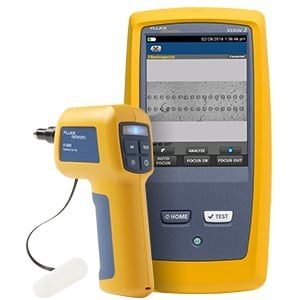
For dense MPO interfaces, an overall connector view can help identify contamination on or adjacent to fibers before detailed inspection. The FI2-7300 is described as providing a Live View of the full connector face, followed by views of individual fibers.
When should dry cleaning or wet cleaning be used for fiber endfaces?
Dry cleaning may be used first for applicable contamination, but wet cleaning with a lint-free wipe and fiber-cleaning solvent may be needed if contamination remains after dry cleaning. After wet cleaning, excess solvent should be removed with a dry area of the wipe or a new dry wipe, followed by inspection.
For endfaces inside ports or equipment, lint-free swabs are used instead of wipes. Use only enough pressure to clean the endface, rotate the swab in one direction, avoid excessive solvent, and discard each wipe or swab after one use to avoid spreading contamination.
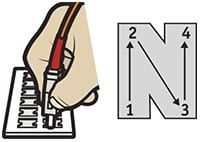
What cleaning-tool sizes are identified for common fiber connector types?
Cleaning tools should match the connector format being serviced. The source material identifies the following Quick Clean™ pen sizes for specific connector groups and MPO configurations.
| Cleaning pen size | Connector application stated in the source |
|---|---|
| 1.25 mm | LC and MU connectors and endfaces |
| 2.5 mm | SC, ST, FC, and E2000 connectors and endfaces |
| MPO 12/24 | Base-12 MPO connectors |
| MPO 16/32 | Base-16 MPO connectors |
Inspection remains the final check regardless of the cleaning method or tool used. A clean-looking component should be verified with an appropriate inspection tool before it is mated.