
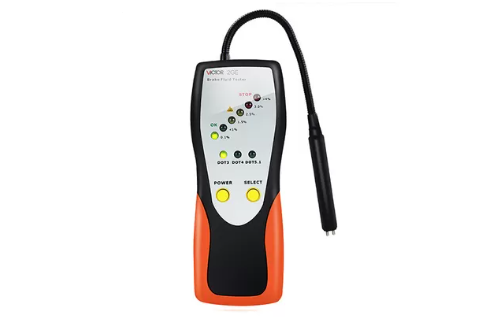
VICTOR 2GF Automotive Brake Fluid Tester (water content LCD detect)
1. Install one 9V(6F22) battery at the back of tester.
2. After inserting the battery, press POWER button to turn on the tester, all LEDs lights turn on with buzzer sounding,
indicates the product self-test is successful.
3. Press SELECT button, it will locate DOT3 model automatically.
4. Each time you push the SELECT button, it will recycle from DOT3 to DOT4 to DOT5.1 with the indicator LEDs.
5. Immerse the probe into brake fluid, the different colored LED lights mean as below:
Green Light: indicates the brake fluid water content is below 1%
The First Yellow Light: indicates the brake fluid water content is approximately 1.5%
The Second Yellow Light: indicates the brake fluid water content is approximately 2.5%
The First Red Light: indicates the brake fluid water content is approximately 3%
The Second Red Light: indicates the brake fluid water content is more than 4%
6. Press POWER button to turn off the tester.
Get exclusive volume discounts, bulk pricing updates, and new product alerts delivered directly to your inbox.
By subscribing, you agree to our Terms of Service and Privacy Policy.
Direct access to our certified experts