Oven temperature logger records air and part temperatures at multiple locations as a load moves through a batch or conveyorized heating process. For powder coating, this information helps verify whether the part has been exposed to the required temperature conditions for the required period.
A logger, thermocouple probes, a thermal barrier, and reporting software can turn a heating cycle into documented data. The PosiTest OTL is designed to record air and surface temperatures in high-temperature oven environments using up to six K-type thermocouple channels.
Why is oven temperature profiling important for powder coating cure?
Oven temperature profiling helps determine whether all areas of a coated part experience sufficient heat for the required cure period. A coating can appear acceptable visually while an under-cured area may not meet durability requirements.
Temperature data also provides a basis for checking oven performance over time. It can support quality control, fault finding, process optimization, and efforts to reduce unnecessary energy use in baking and powder-coat curing operations.
What does oven temperature profiling measure?
Oven temperature profiling measures temperatures at multiple locations on a part while it passes through a heating process. Measurements may include both the oven air temperature and the surface temperature of the part.
To capture variation across the load, probes are commonly placed on thin and thick areas and on high and low locations. Using at least one air-temperature sensor alongside surface probes helps distinguish the oven environment from the temperature response of the part.
How is an oven temperature profile collected?
An oven temperature profile is collected by attaching thermocouple sensors to the test part, placing the logger in its thermal barrier, sending the assembly through the oven, and analyzing the stored measurements afterward.
- Connect the required temperature sensors to the data logger and attach them to representative locations on the part.
- Place the logger in the thermal barrier.
- Run the protected logger and test part through the batch or conveyorized oven process.
- Import, review, and report the recorded temperature data.
This process documents how temperature changes over time rather than relying only on a single oven setpoint. It can therefore reveal differences in heating behavior between locations on the same part.
What is an oven temperature logger?
An oven temperature logger is an instrument that receives readings from temperature sensors, stores those readings, and makes them available for analysis and reporting. It is configured to collect temperature data consistently during an oven cycle.
The PosiTest OTL has six K-type thermocouple ports and records measurements every two seconds for up to 22 hours. Its internal memory stores up to 40,000 data sets, equivalent to 240,000 readings across the available channels.
Which thermocouple probe style should be used on a part?
The appropriate probe style depends on how the sensor needs to attach and whether air or surface temperature is being measured. The available configurations described for the PosiTest OTL include spring clamp, magnetic, and washer-style probes with stainless-steel braided cable lengths of 1.8 m, 3.6 m, or 6 m.
- Spring clamp probes: Attach to differently sized parts and can be used for air or surface temperature measurement.
- Magnetic probes: Attach to steel parts with a magnet and can be used for air or surface temperature measurement.
- Washer-style probes: Attach to a part with a screw or bolt for surface temperature measurement.
How can reporting software evaluate time above temperature?
Reporting software can calculate how long a measured point remains above selected temperature thresholds. This “time above temperature” information is relevant when a coating specification requires the coating to be maintained above a defined temperature for a prescribed time.
PosiSoft Desktop can calculate time above temperature at up to three threshold temperatures simultaneously. It can also graph data from up to six channels, using color-coded traces to help identify and compare the individual probe locations.
How can Cure Index and reference profiles be used?
A Cure Index can compare entered activation temperature and cure-schedule information with recorded oven and part temperatures. This provides a structured way to assess actual temperature history against the applicable supplier cure requirements.
PosiSoft Desktop can also graph a current batch alongside a stored reference profile, allowing a direct visual comparison between batches. Its Start at Temperature option can reset elapsed time when a selected probe rises above a chosen temperature, helping align profiles when loading times differ.
What is the difference between the PosiTest OTL Kit and PosiTest OTL XT Kit?
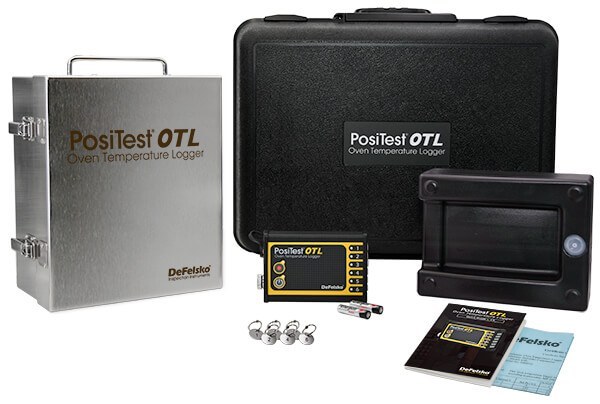
The PosiTest OTL Kit includes the temperature logger, a stainless-steel high-temperature box with fiberglass insulation, a holder, six engraved probe ID tags, and a carrying case. The PosiTest OTL XT Kit includes these items and adds an enhanced holder with a heatsink for greater endurance at high temperatures.
The barrier box, holder choice, temperature, and exposure duration together affect thermal performance. The stated high-temperature barrier arrangement is capable of withstanding temperatures up to 300°C (572°F) for up to 300 minutes, with actual thermal characteristics dependent on the kit configuration, temperature, and time.
When should an oven profile be reviewed?
An oven profile should be reviewed when verifying cure conditions, comparing production batches, investigating suspected hot or cold areas, or checking whether oven conditions remain within specified temperatures. Reviewing the profile is especially useful when a process changes or when temperature consistency across a part is important.
Temperature chart recorder does not replace the coating supplier’s cure requirements; it documents the measured temperature history so those requirements can be evaluated against actual process conditions.